
By DTG, Digital Technology Group, Tampa, FL. Published October 19, 2026.
For photo and fine-art print proofing, choose an Eizo ColorEdge with 99% Adobe RGB coverage and hardware calibration, sized to the way you work. A CS model with an Eizo sensor covers most print shops and photographers. A CG model adds a built-in sensor, scheduled self-calibration and a faster warm-up for studios that proof all day. This guide walks through what matters when the goal is a screen that predicts the print, using specifications published by Eizo, and links to the ColorEdge models DTG sells.
Questions about matching your monitor to your printer? Talk to DTG or call 813.889.0660.
What “print proofing” asks of a monitor
Soft proofing means previewing on screen how an image will look on a specific printer, ink and paper before you spend media on it. For that preview to be trustworthy, the monitor has to do four things well:
- Show the colors your printer can reach. Pigment-ink printers like the Epson SureColor P series and Canon imagePROGRAF PRO series can print colors outside sRGB, especially greens and cyans. A monitor that covers Adobe RGB can display them. Every ColorEdge CS and CG model listed below covers 99% of Adobe RGB, per Eizo.
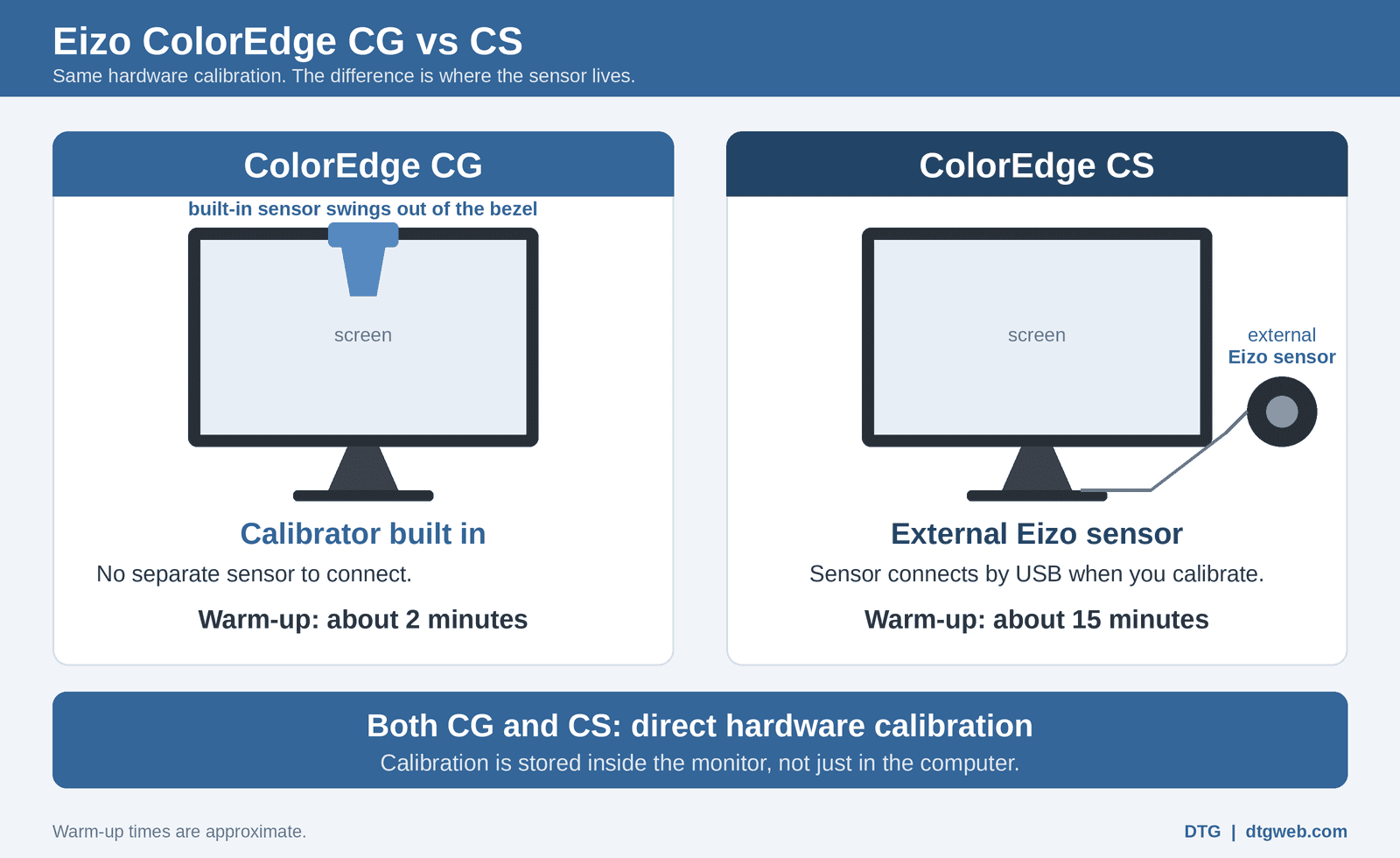
- Stay calibrated. ColorEdge monitors use hardware calibration with Eizo’s free ColorNavigator 7 software. The calibration is stored in the monitor itself, not just the computer.
- Be even across the screen. Eizo’s Digital Uniformity Equalizer evens out brightness and color from corner to corner, so a sky or a paper-white border looks the same everywhere.
- Run at print-friendly brightness. Paper reflects light; it doesn’t glow. Proofing works best with the monitor turned well below typical office brightness and matched to your viewing light. Eizo’s software sets this for you.
If your prints come out darker or a different color than your screen, read Why Doesn’t My Print Match My Screen? first. The monitor is usually part of the answer.
Screen-to-print tools that come with ColorEdge
ColorNavigator 7 calibrates the monitor to targets you choose, including brightness and white point suited to print work. Quick Color Match, a free Eizo tool developed with Adobe, Canon and Epson, goes a step further for desktop photo printers. It adjusts the monitor for the paper you pick, opens Photoshop with Eizo’s recommended color settings, and selects the print profile and soft-proofing options in Epson Print Layout or Canon Print Studio Pro.
Eizo lists Quick Color Match support for the ColorEdge CS2731, CS2740 and CG2420, among others, and for printers including the Epson SureColor P700, Epson SureColor P900 and Canon imagePROGRAF PRO-1000. Supported papers vary by printer; check Eizo’s Quick Color Match page for the current list. Wide-format P and PRO printers proof through Photoshop or Lightroom soft-proofing with the printer’s ICC profile, which a calibrated ColorEdge supports just as well.
Which ColorEdge for print proofing?
CS series: hardware calibration with an external sensor
CS models calibrate with an external Eizo sensor such as the EX5. DTG sells several as bundles with a sensor so you start calibrated on day one.
- ColorEdge CS2400S with calibrator (24.1-inch, 1920 x 1200): a compact proofing screen for a desk next to a 13- or 17-inch printer. Also sold without the sensor.
- ColorEdge CS2731 with calibrator (27-inch, 2560 x 1440): a popular all-round choice for photographers and print shops, and supported by Quick Color Match. Also sold without the sensor.
- ColorEdge CS2740 with calibrator (27-inch, 3840 x 2160 4K): extra detail for retouching high-resolution files before large prints, also supported by Quick Color Match. Also sold without the sensor.
- ColorEdge CS3200X with EX5 sensor (31.5-inch, 3840 x 2160 4K): Eizo lists 99% Adobe RGB, 350 cd/m² brightness and a hood in the box. A large canvas for panoramas and big fine-art files. Also sold without the sensor.
CG series: a built-in sensor for studios that proof all day
CG models have a calibration sensor built into the bezel and can recalibrate on a schedule, and they ship with a light-shielding hood. In our experience a CG also reaches stable color within a couple of minutes, against about 15 minutes for a CS.
- ColorEdge CG2400S (24.1-inch, 1920 x 1200).
- ColorEdge CG2700S (27-inch, 2560 x 1440).
- ColorEdge CG2700X (27-inch, 3840 x 2160 4K).
- ColorEdge CG3100X (30.5-inch 4K), which Eizo lists at 97% Adobe RGB.
A note on the new ColorEdge CG3200X: it is Eizo’s first QD-OLED ColorEdge, with very high contrast and 99% DCI-P3, aimed largely at HDR and video work. Eizo lists 94% Adobe RGB, and the OLED panel carries a 1-year or 10,000-hour warranty that does not cover burn-in. For print proofing alone, the LCD models above are the more natural fit.
Still deciding between the two families? See Eizo ColorEdge CG vs CS: Which Series Should You Buy?
Match screen size to print size and workspace
- 13- to 17-inch desktop printers (Epson P700, P900, Canon PRO-1000): a 24- or 27-inch ColorEdge is usually plenty.
- 24- to 44-inch wide-format printers (Epson SureColor P6570, P8570, P7570, P9570, Canon PRO-2600, PRO-4600): a 27-inch 4K or 31.5-inch 4K screen makes it easier to check detail before committing a large sheet of fine-art paper.
- Viewing light: a hood helps block room light that washes out the screen. CG models and the CS3200X include one; for 27-inch CS models DTG sells the Eizo CH2710 hood, and the CH2410 fits 24-inch models.
Close the loop with profiles for your paper
A calibrated monitor shows the truth only if the printer profile describes your exact printer, ink and paper. Manufacturer profiles are a good start. For papers or printers without a good profile, DTG offers a custom profiling service. Browse fine-art papers in fine-art and giclee media and photo papers in photo media.
For more background, read Why Photographers Need a Color-Accurate Monitor and Color-Accurate Monitors for Fine Art Reproduction, or browse all Eizo monitors at DTG.
FAQ: ColorEdge monitors for print proofing
Do I need an Adobe RGB monitor for printing photos?
For soft proofing on pigment-ink photo and fine-art printers, it helps. These printers can reproduce some colors outside sRGB, and a monitor that covers Adobe RGB can show them. The ColorEdge CS and CG LCD models in this guide cover 99% of Adobe RGB, per Eizo.
Should I buy a ColorEdge CS or CG for print proofing?
Both use hardware calibration. A CS with an Eizo sensor suits most photographers and print shops. A CG adds a built-in sensor, scheduled self-calibration, a hood and a faster warm-up, which matters most in studios that proof all day.
What is Eizo Quick Color Match?
A free Eizo tool, developed with Adobe, Canon and Epson, that sets up a supported ColorEdge, Photoshop and the Epson or Canon print plugin for screen-to-print matching on supported desktop photo printers and papers.
Why do my prints look darker than my screen?
Most often the monitor is too bright for print work. Calibrating to a lower brightness that matches your viewing light, and soft proofing with the correct paper profile, usually closes the gap.
How often should I calibrate a ColorEdge?
CG models can recalibrate themselves on a schedule you set. For CS models with an external sensor, we suggest every two to four weeks.
Want help pairing a ColorEdge with your printer? Contact DTG or call 813.889.0660.


