
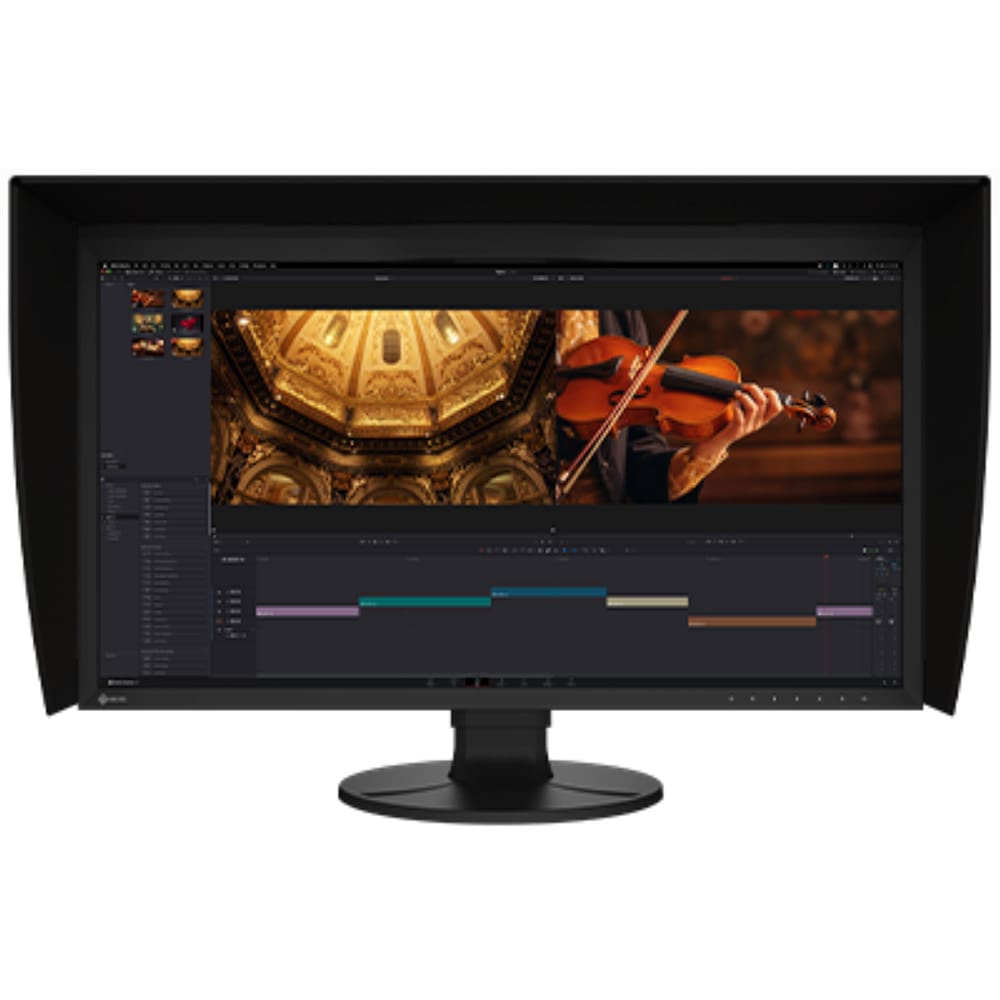

Description
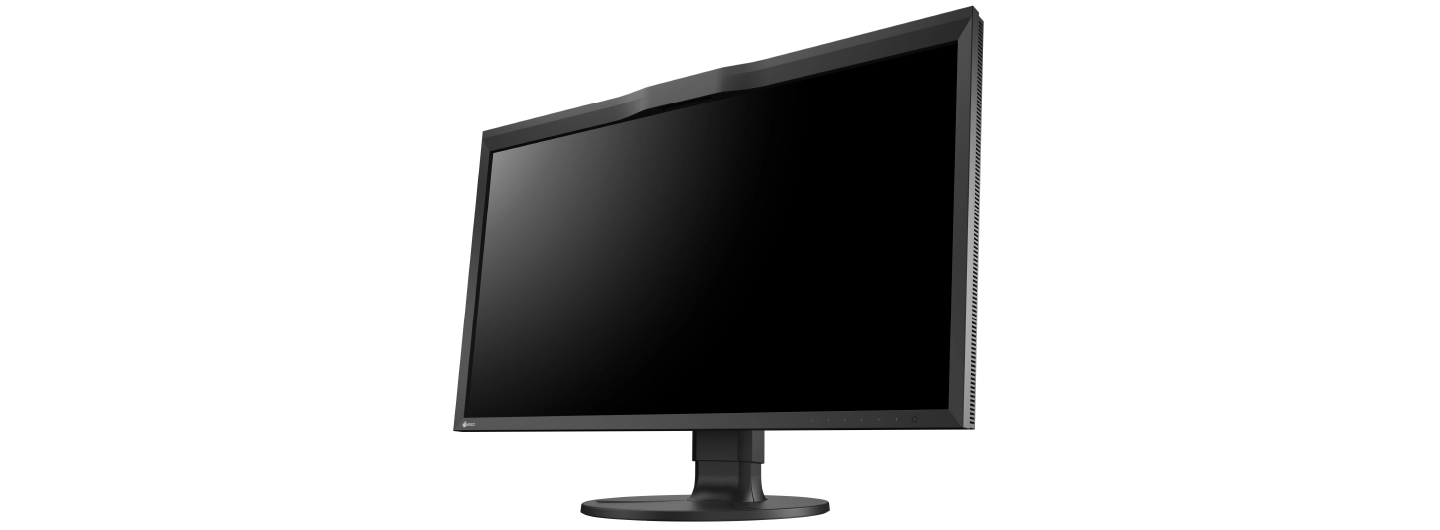
The Eizo ColorEdge CG3100X is a 30.5-inch DCI 4K (4096 x 2160) color management monitor with a built-in calibration sensor, 500 cd/m² typical brightness and HLG and PQ HDR gamma. One USB-C cable carries video and up to 94 W of power, and a light-shielding hood is included. Compare it with the CG2700X or the PROMINENCE CG1, or call DTG in Tampa, FL at 813.889.0660.
Eizo ColorEdge CG3100X key specifications
| Screen size | 30.5″ |
|---|---|
| Native resolution | 4096 x 2160 (DCI 4K, 17:9) |
| Pixel density | 152 ppi |
| Brightness (typical) | 500 cd/m² |
| Contrast ratio (typical) | 1800:1 |
| Color gamut (typical) | Adobe RGB 97%, DCI-P3 99% |
| HDR gamma | HLG, PQ |
| Calibration sensor | Yes (built in) |
| USB-C power delivery | Up to 94 W |
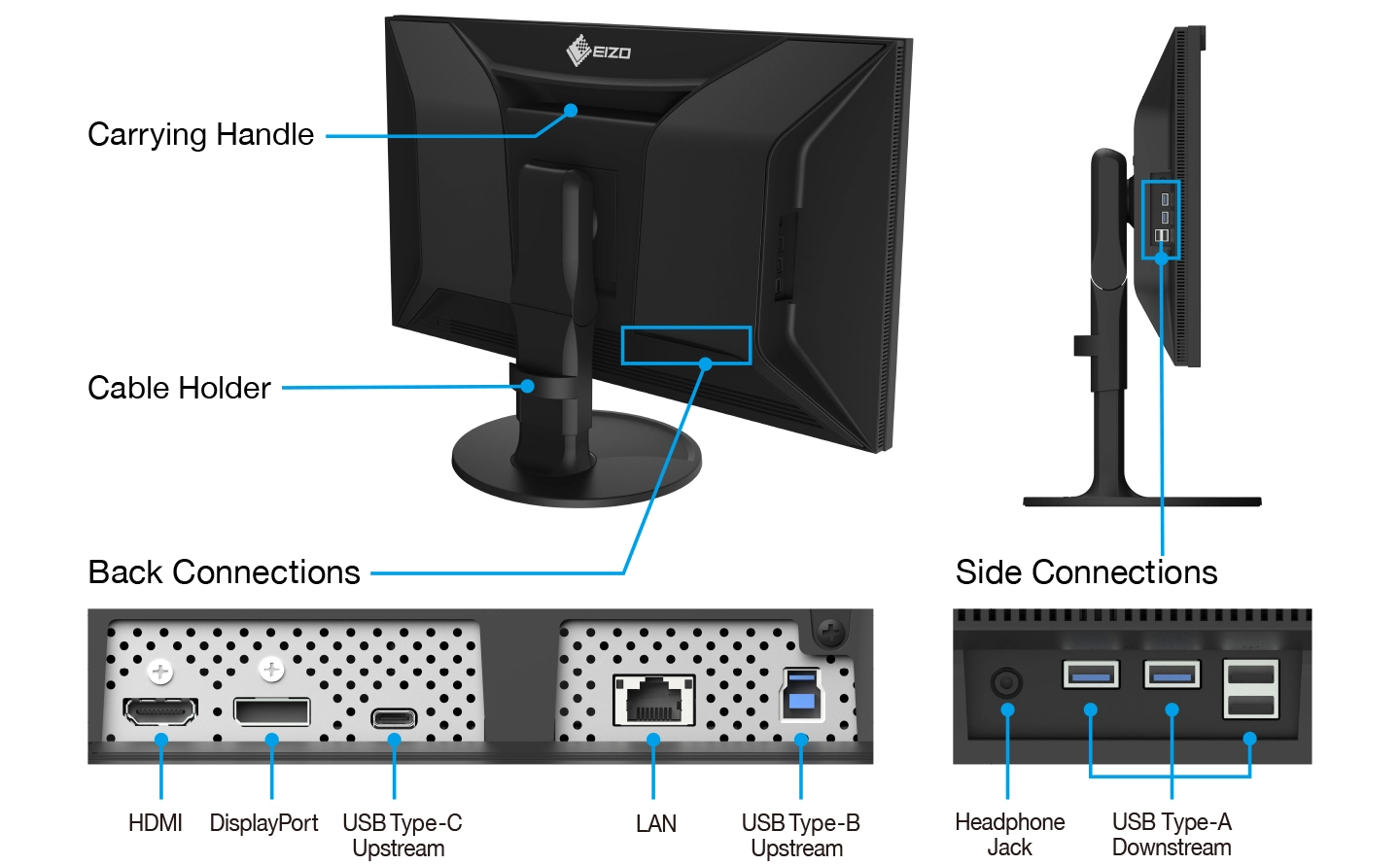
| Video inputs | USB Type-C, DisplayPort, HDMI |
| Light-shielding hood | Included |
| Net weight (with stand) | 12.3 kg |
| Warranty | 5 years (manufacturer’s warranty; usage time limited to 30,000 hours) |
Specifications as listed on Eizo’s US product page (eizo.com), checked October 1, 2026. Brightness, contrast and gamut values are typical values.
Expand your creative horizons
This 30.5-inch professional-grade monitor features stunning DCI 4K (4096 x 2160) resolution, 500 cd/m2 high brightness, HDR gamma support, and versatile USB Type-C® connectivity. Whether you’re creating, editing, or working in a live environment, display your content in exceptional detail for an immersive experience and truly captivating results.
High brightness is crucial in modern editing and post-production workflows to support HDR and ensure consistent display of colors and highlights in video content. The CG3100X features a high brightness of 500 cd/m², up from 350 cd/m² in the CG319X, while delivering highly detailed images in DCI 4K. This ensures optimal display of highlights in 4K content, meeting the technical requirements of today’s creators. Additionally, the monitor boasts a high contrast ratio of 1800:1 for producing true blacks and rendering shadows in high detail.
The CG3100X further ensures professionals can reliably create and edit in HDR by supporting the hybrid log-gamma (HLG) transfer function for broadcasts and the perceptual quantization (PQ) curve. These optimized gamma curves render images to appear truer to how the human eye perceives the real world compared to SDR (standard dynamic range).
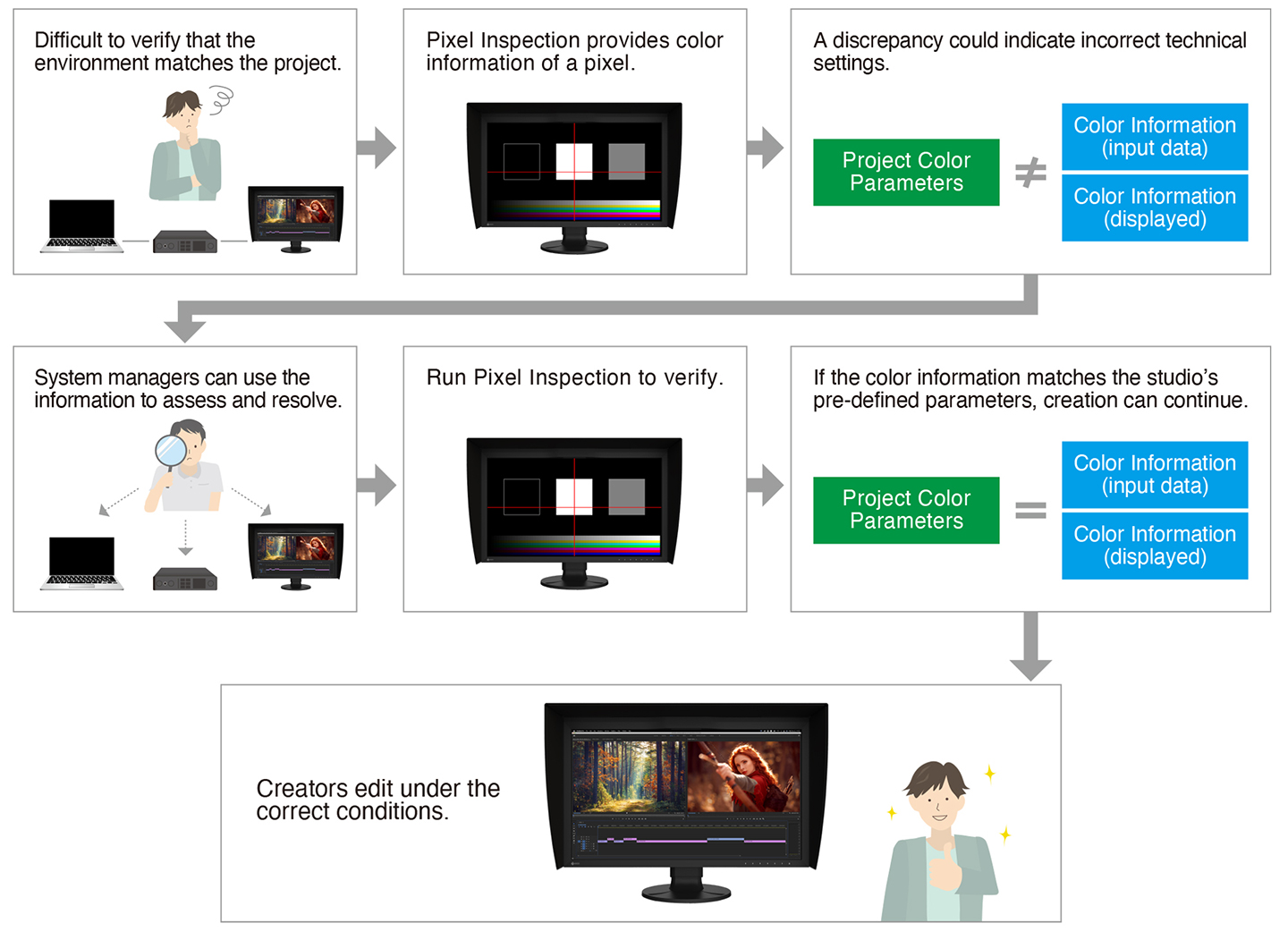
Working within incorrect color parameters can affect editing decisions, leading to significant rework and costly delays. The monitor’s Pixel Inspection function enables system managers to verify technical settings and reduce the likelihood of these setbacks. This function allows users to select any pixel on the screen and display the color information from the source input data and the data as it appears on the monitor.
Notable features
- 97% Adobe RGB and 99% DCI-P3 color space coverage
- 3D LUT for enhanced color precision
- Screen uniformity with patented digital uniformity equalizer (DUE) technology
- Headphone jack for wired audio output
- USB Type-C, DisplayPort and HDMI inputs
- Hood included
- 5-year warranty
Features for Working in 4K HDR
Enhanced Display Quality
The CG3100X offers exceptional visual performance with high brightness, high contrast, and HDR support. Featuring a brightness level of 500 cd/m2 and a contrast ratio of 1800:1*, the monitor meets DCI standards to ensure content is displayed clearly with added depth and detail.
For HDR content, the monitor supports the gamma (EOTF) compatible hybrid log-gamma (HLG) transfer function for broadcasting and perceptual quantization (PQ) curve for production of films and streamed content. Additionally, users can set any camera log using ColorNavigator 7 to view the camera log video on the monitor during filming.
*Typical value when DUE Priority is set to “Brightness”.
EOTF stands for Electro-Optical Transfer Function.
HLG and PQ were standardized by the International Telecommunication Union (ITU) as ITU-R BT.2100. PQ was standardized by the Society of Motion Picture Television engineers (SMPTE) as ST-2084.
Image for illustrative purposes only.
Learn more about HDR technology
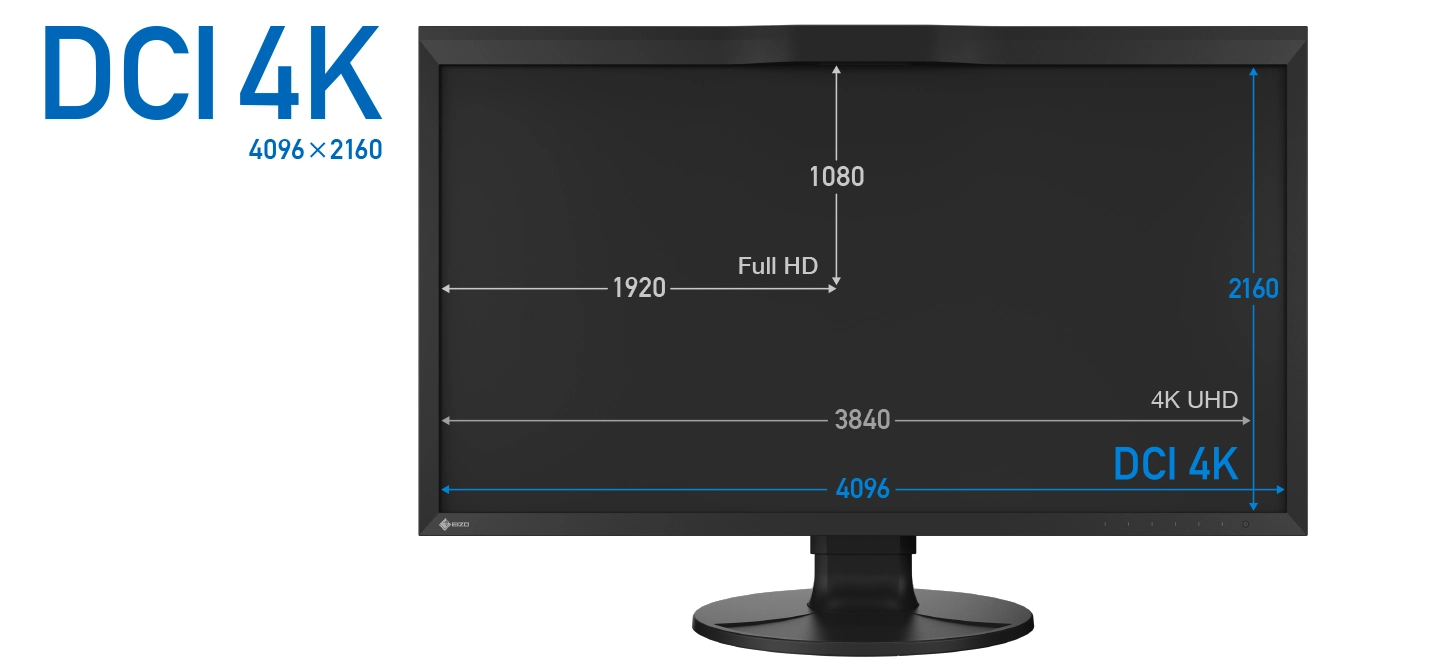
DCI 4K Resolution Across a 30.5-inch Screen
The CG3100X displays at DCI 4K resolution (4096 x 2160) which is more than four times that of Full HD (1920 x 1080). This makes it an optimal solution for creating, editing, and referencing 2D and 3D CGI, VFX, compositing, and color grading.
Color Precision
Industry Standard Color Reproduction with Broadcast and Cinema Presets
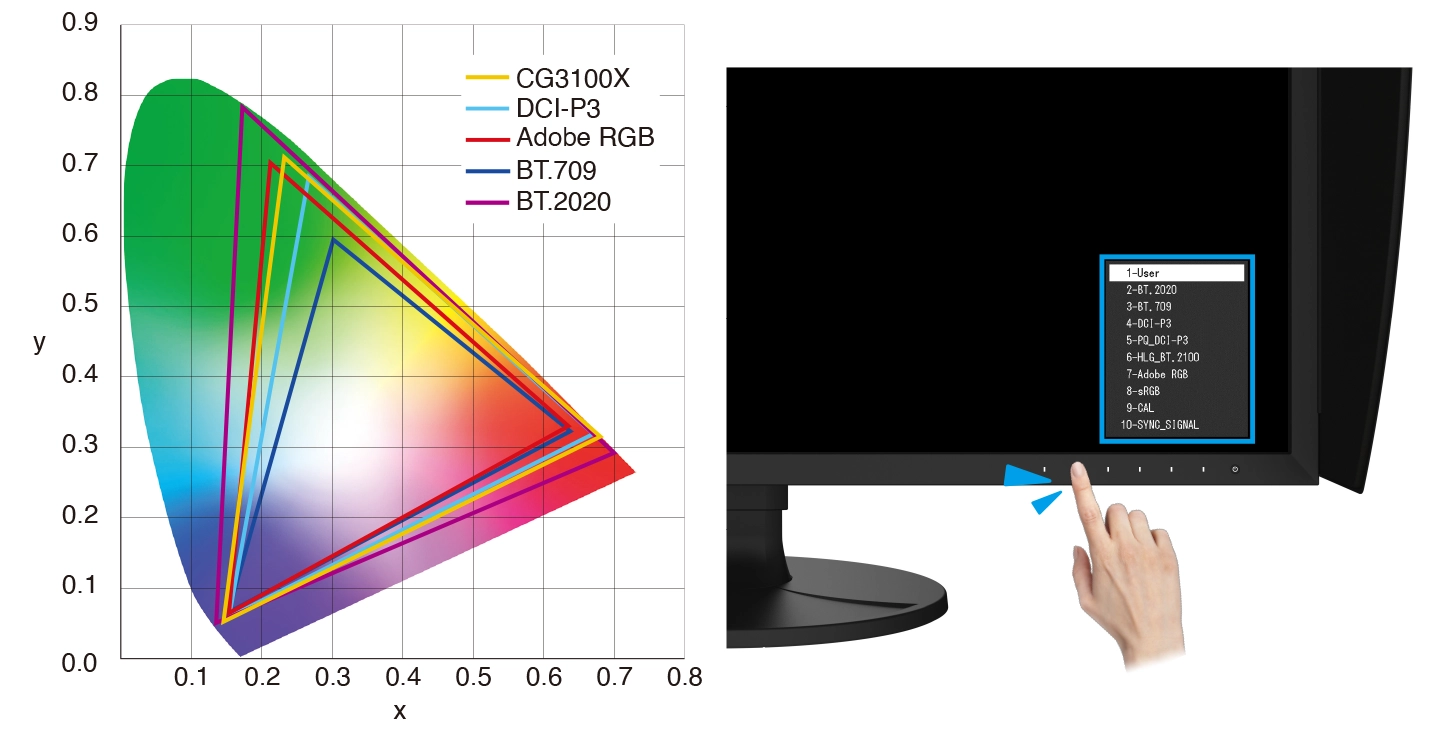
The monitor’s wide color gamut covers 99% of the DCI-P3 standard used in digital cinema and supports the BT.2020 standard used in broadcasting for exceptionally faithful reproduction of color. It also covers 97% of the Adobe RGB color space so images and video shot in Adobe RGB will be displayed correctly. Color mode presets can easily be changed via the switches on the front of the monitor, enabling straightforward color management for each project.
10-Bit Simultaneous Display
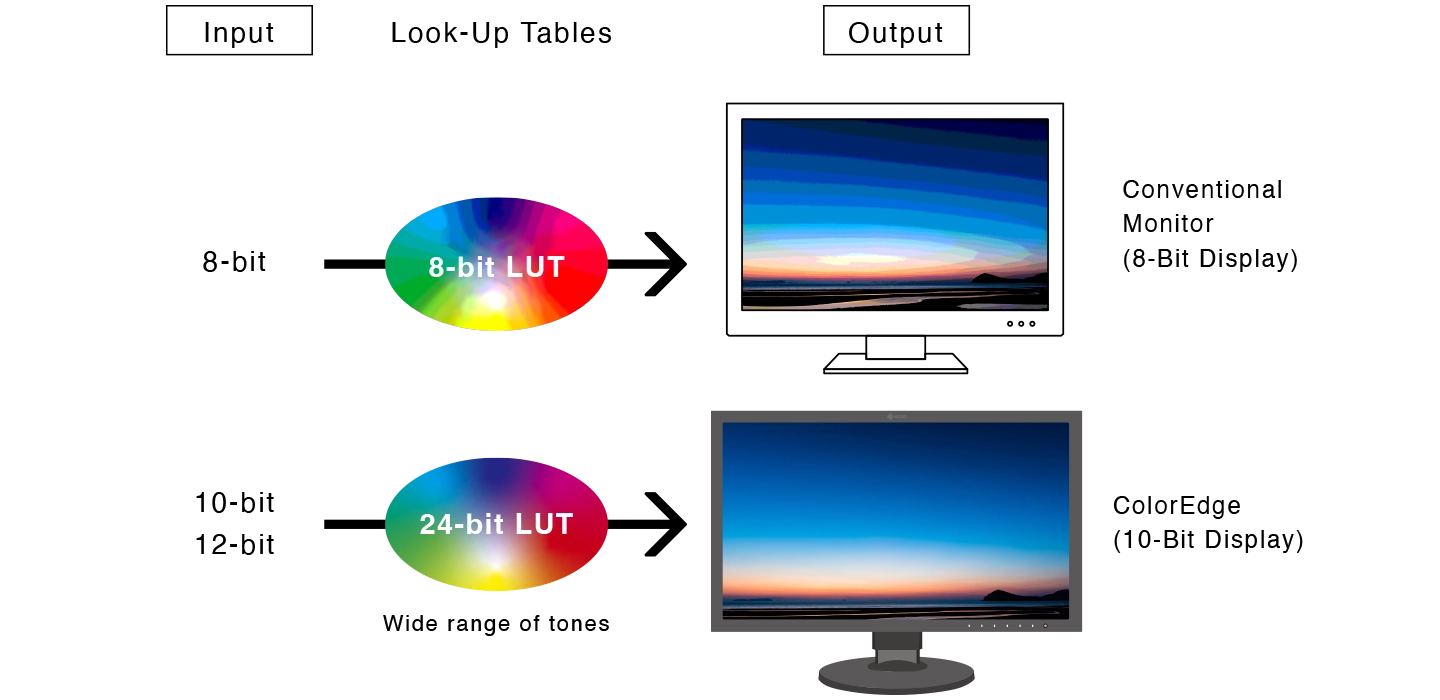
The monitor offers 10-bit simultaneous display* from a 24-bit look-up-table (LUT) which means it can show more than one billion colors simultaneously. This is 64 times more colors than you get with 8-bit display, resulting in smooth color gradations and reduced Delta-E between two adjacent colors.
*A graphics board and software which support 10-bit output are also necessary for 10-bit display. Equipment that supports DeepColor is required for 10-bit display when connected via HDMI® port.
3D LUT for Accurate Color Display
| The monitor is equipped with a 3D LUT (look-up table) which adjusts colors on an RGB cubic table. Using ColorNavigator 7’s film emulation function, users can emulate film color properties using a 3D LUT file.・Japan patent no. 4808588 | 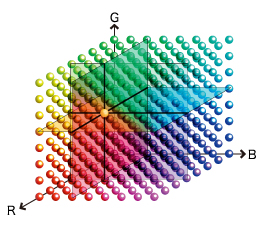 |
Built-In Sensor to Automate Your Workflow
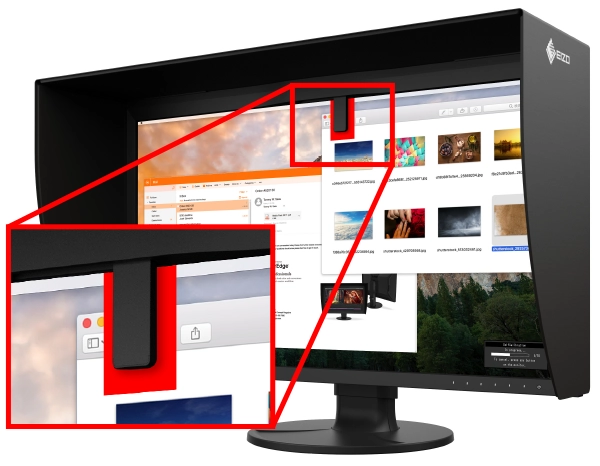
| The monitor’s built-in sensor can be set to calibrate the monitor automatically at designated times. This eliminates the need for a third-party calibration device and ensures your screen stays color-accurate. In addition, the sensor swings onto the screen, taking up minimal space and allowing you to continue working even during calibration.・Japan patent no. 4809453 ・EIZO does not recommend carrying out color-critical work during recalibration, as the screen’s colors will be adjusted. |
 |
ColorNavigator 7 Color Management Software
| EIZO’s proprietary free ColorNavigator 7 software is the complete color management solution for reliable calibration and quality control of ColorEdge monitors. It offers multiple preset color modes, simultaneous calibration of all modes, and automatic recalibration to ensure consistent color accuracy. It also allows calibration targets to be set for brightness, white point, gamma (EOTF), and color gamut for more fine-tuned control.Learn more | 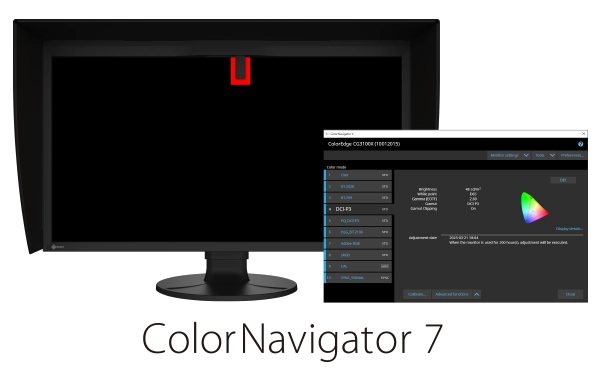 |
ColorNavigator Network Quality Control Software
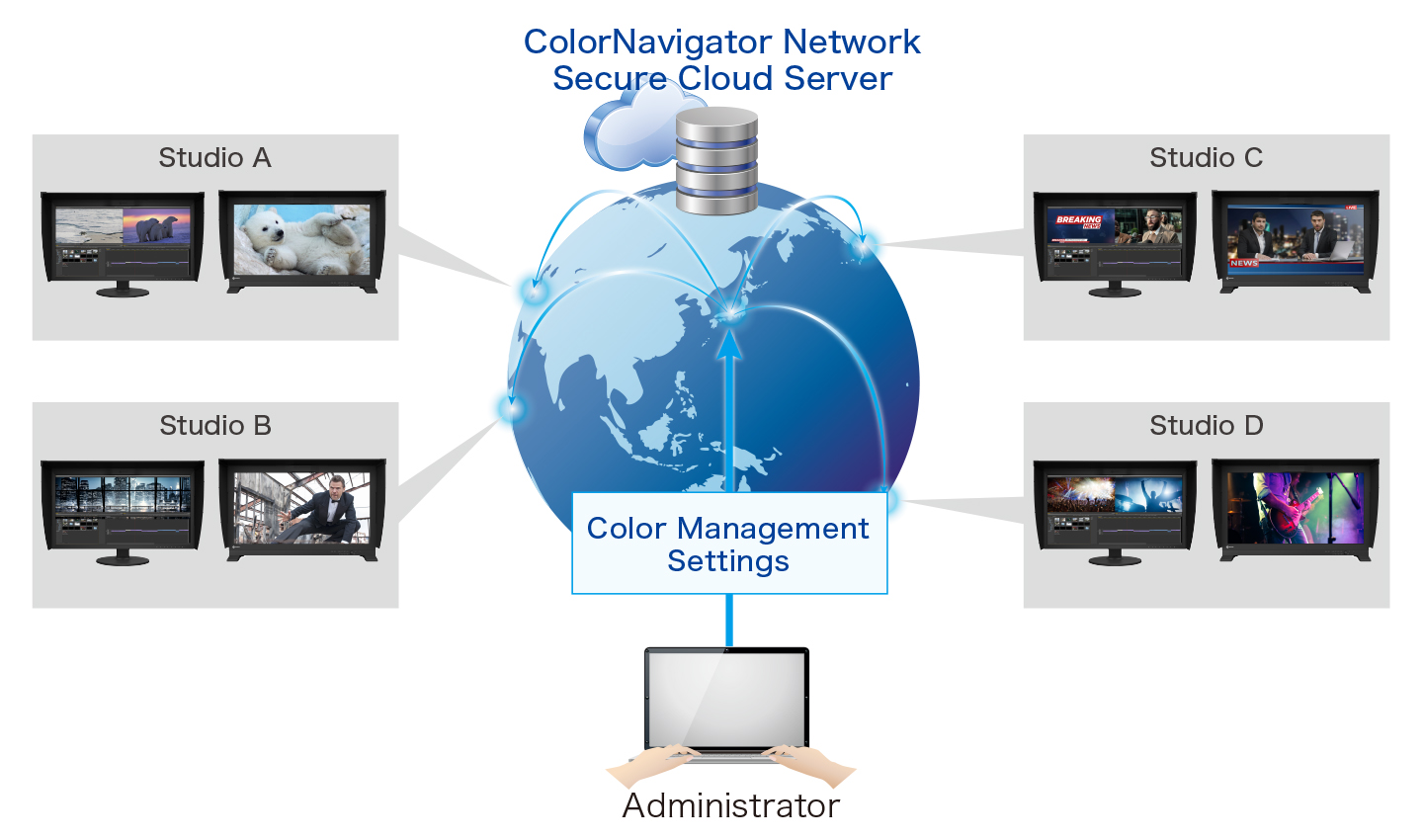
EIZO’s ColorNavigator Network provides centralized quality control of ColorEdge monitors for studios with multiple creators and editors working on shared projects. An administrator can set the color modes, schedule automatic self-calibration for monitors with built-in sensors, register or adjust asset management settings, and more – all carried out remotely over the network. For large-scale projects, this ensures that the appropriate color standards are used at every step and saves hundreds of hours spent on calibration and maintenance.
Comfortable Design, Advanced Connectivity
Sleek Design, Quite Operation
The CG3100X features a sleek design with punched metal on the back, enhancing airflow for effective heat management. Its internal fan operates at just 20 dB, ensuring a quiet workstation environment.
Flexible Connection
DCI 4K/60p Support
The monitor’s DisplayPort™ and HDMI inputs support up to DCI 4K at 60p 4:4:4 10-bit and 12-bit, respectively. This ensures smooth and fluid motion with precise color representation for video editing and post production work.
FRL Support for High-Speed Transmission
The CG3100X supports Fixed Rate Link (FRL), the latest signal technology supported in the latest HDMI specification. FRL is required to receive 12-bit signals, handle higher uncompressed high-resolution data, such as 4K, and take advantage of high-speed bandwidths for compressed video transport over an HDMI connection. The monitor comes bundled with an Ultra High Speed HDMI Cable for reliable 4K performance.
Single Cable Connection with USB Type-C
The monitor is equipped with a USB Type-C port for streamlined connection with laptops or creative workstations. With a single cable, users can display video, access the monitor’s multi-port USB hub, and charge their device with up to 94W of power delivery. This helps maintain a tidier workspace by keeping the area free of excess cable clutter. It also offers stable network access for sharing creative assets and files via the monitor’s built-in LAN port.
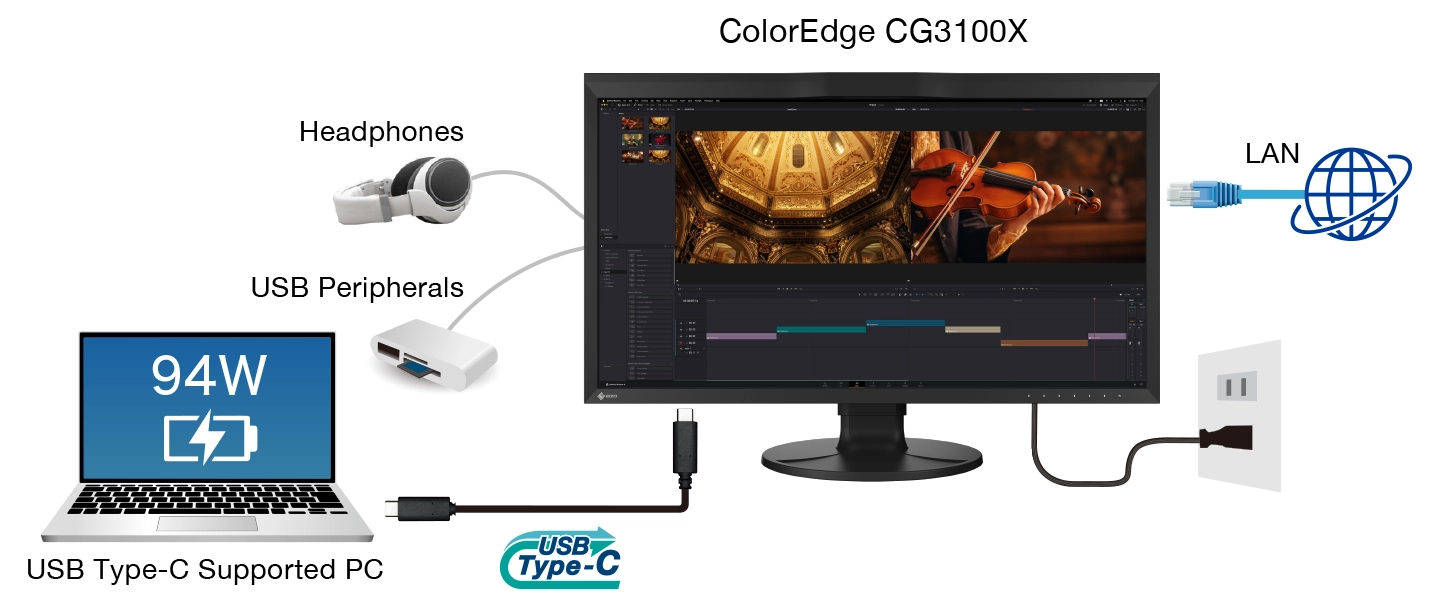
Headphone Jack for Direct Audio Output
The CG3100X features a headphone jack for conveniently checking audio content.
| Light-Shielding HoodThe monitor comes bundled with a light shielding hood that effectively prevents glare on the screen caused by ambient lighting. The hood is designed to be lightweight and easily attaches to the monitor magnetically without needing to connect separate parts. | 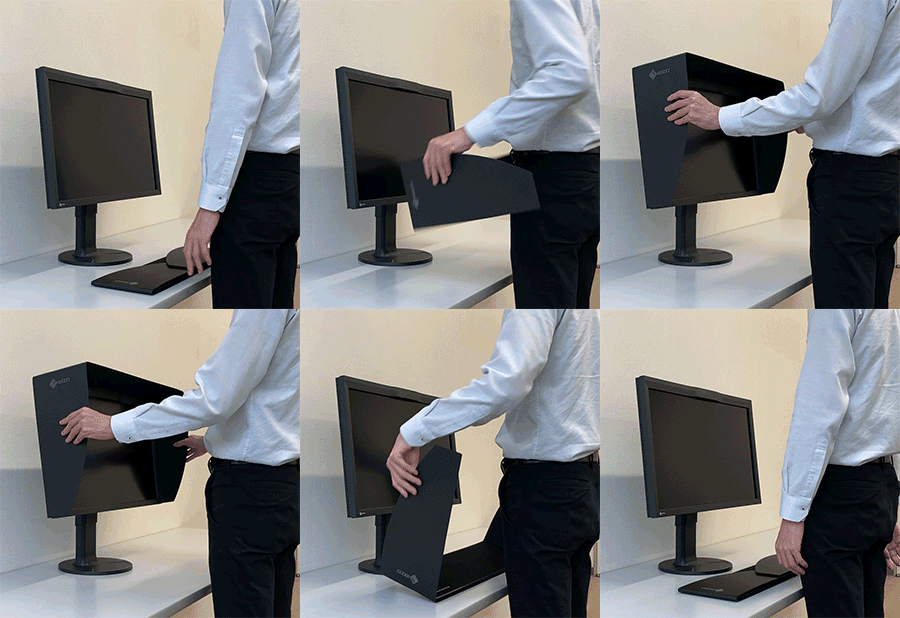 |

Scan the code using your smartphone or tablet
to see how EIZO fits into your environment with augmented reality.Supported Models:iPhone 6s or later, iPad (5th generation or later)
ARCore supported Android devicesSupported Browsers:Safari, Chrome
Functions for Editing and Post Production
Pixel Inspection
Working within the wrong parameters affects editing decisions, potentially requiring significant rework of projects and causing costly delays in production schedules. Pixel Inspection, operated through the monitor’s OSD, shows the color information of a pixel from the source input data and the data as it is displayed on the monitor.
System managers can use this information to verify that the creator’s technical settings match the current project’s predefined color parameters. This is especially helpful when creators are working remotely and system managers cannot verify settings directly. By ensuring that creators are working under the appropriate technical conditions, studios can reduce the likelihood of project rework due to mismatched technical settings.
Check PQ Contents at Any Brightness Level
The monitor offers an optional PQ gamma curve (EOTF) function that allows the input signal to be clipped or compressed to fit within the luminance value of the monitor. This allows users to simulate how the signal will appear in other display environments. The Auto setting under PQ Option menu automatically adjusts the PQ curve according to the monitor’s current brightness.
Sync Signal
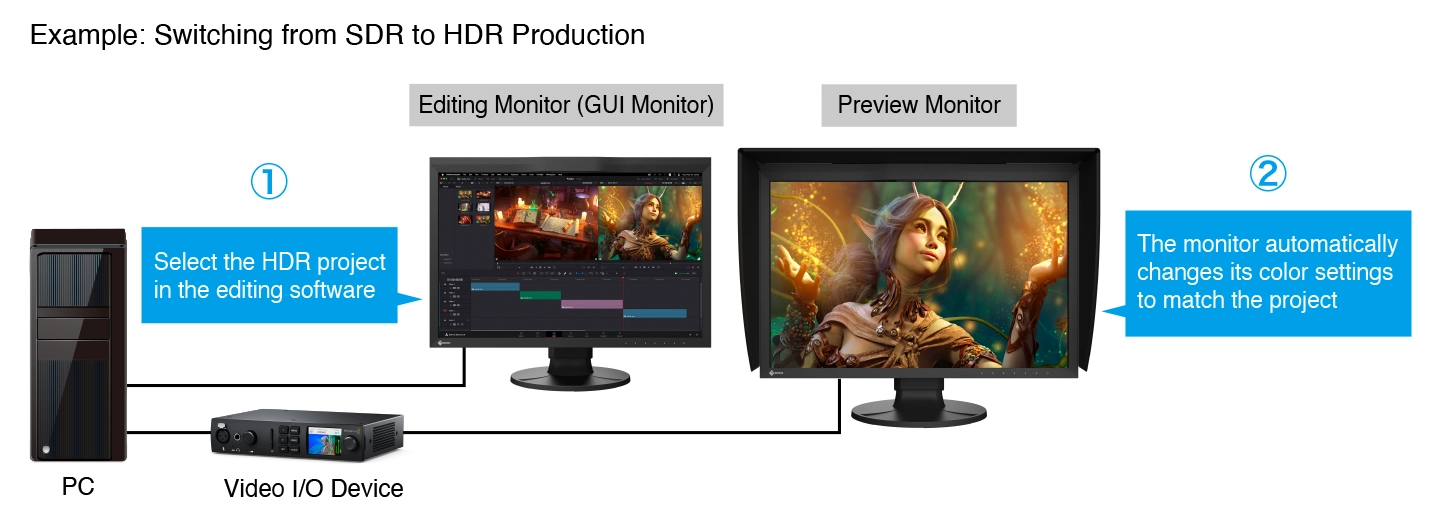
The monitor’s Sync Signal function automatically switches the color settings – brightness, gamma (EOTF), and color gamut – according to the metadata of the input signal. This eliminates the need to manually switch color settings when working on multiple projects, so users can be confident that they are always working with the correct settings.
Nearest Neighbor Interpolation
The ColorEdge CG3100X offers Nearest Neighbor interpolation setting as an option for image scaling and resampling. When upscaling, Nearest Neighbor copies and aligns pixels to the closest adjacent position, maintaining color fidelity. When Nearest Neighbor is turned off, the monitor uses an interpolation method that balances gradation of the surrounding pixels for smooth color tone. Editors can easily choose the interpolation method best suited to the project via the monitor’s OSD menu to ensure content looks as intended when upscaling to 4K.
Luminance Warning
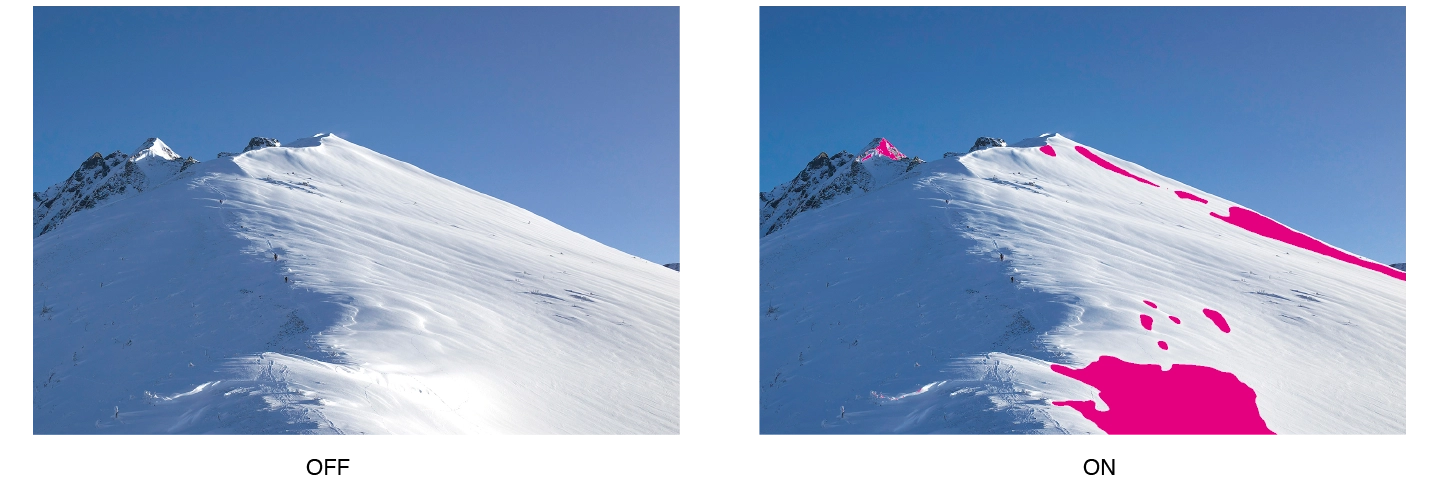
The PQ Option function allows you to check PQ content at any brightness level and shows the areas of the image that are clipped when displayed at a specified brightness level. These areas are marked in yellow or magenta to easily distinguish them within the image.
4K Zoom
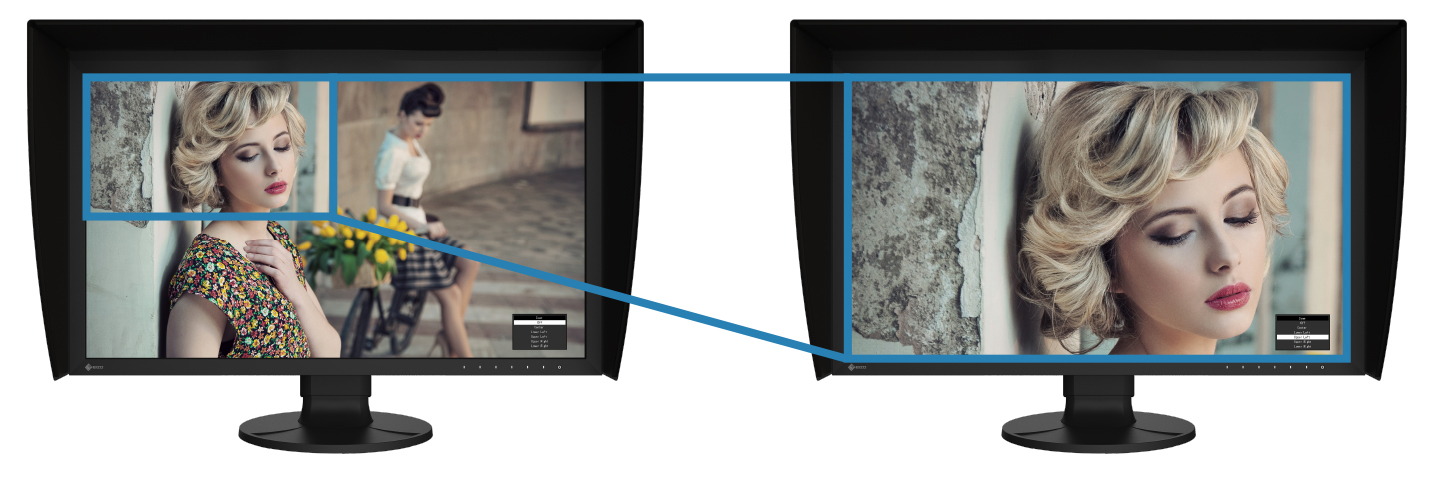
The 4K zoom function allows users to enlarge areas of the screen to check fine details and accuracy of the focus in the scene. This function is quickly and easily accessible using the monitor’s front switches.
| BT.709 Out-of-Gamut WarningThe monitor includes a Gamut Warning mode that indicates areas of a BT.2020 image that cannot be reproduced in the BT.709 color space, which is the standard for Full HD broadcasts, by displaying them in shades of gray. An additional mode called BT.709 Clipping allows the editor to view BT.2020 images within the BT.709 color space, simulating how it would look in an HDTV environment. | 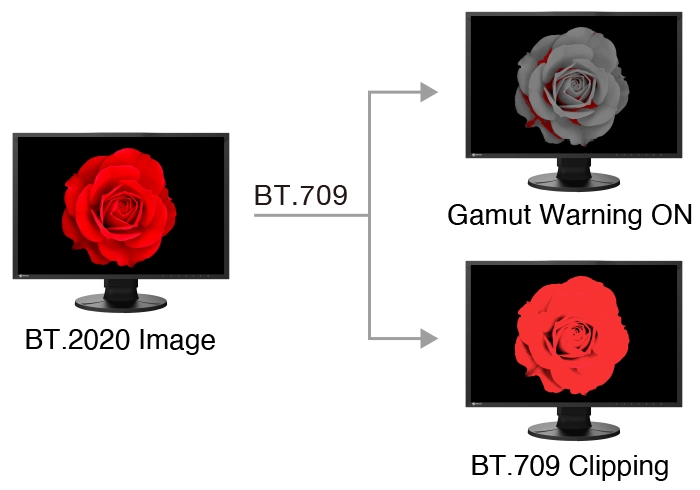 |
Markers for Information Overlay
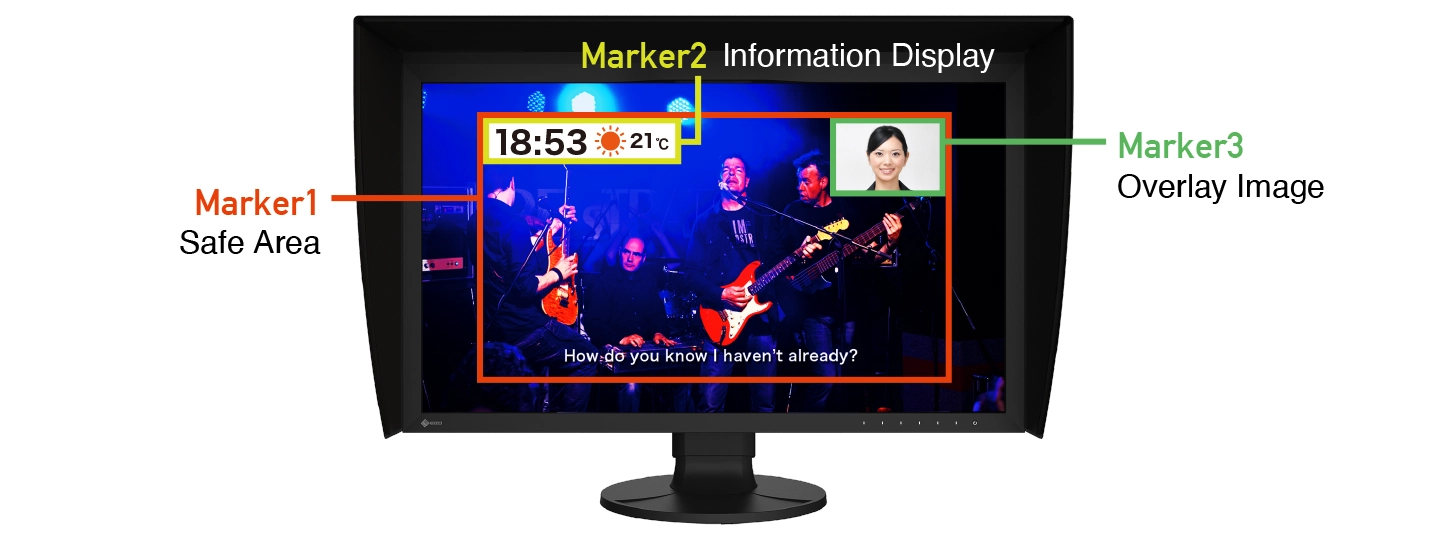
The CG3100X features a marker function to ensure that content, such as text or graphics, is properly positioned on the screen. The Safe Area Marker marks an area of the screen within which captions or other information will appear to ensure they are visible during broadcast. The position and size of the markers can be specified to suit the current project.
Stable Image Display
Adjusted at the Factory for Smooth Color Gradations
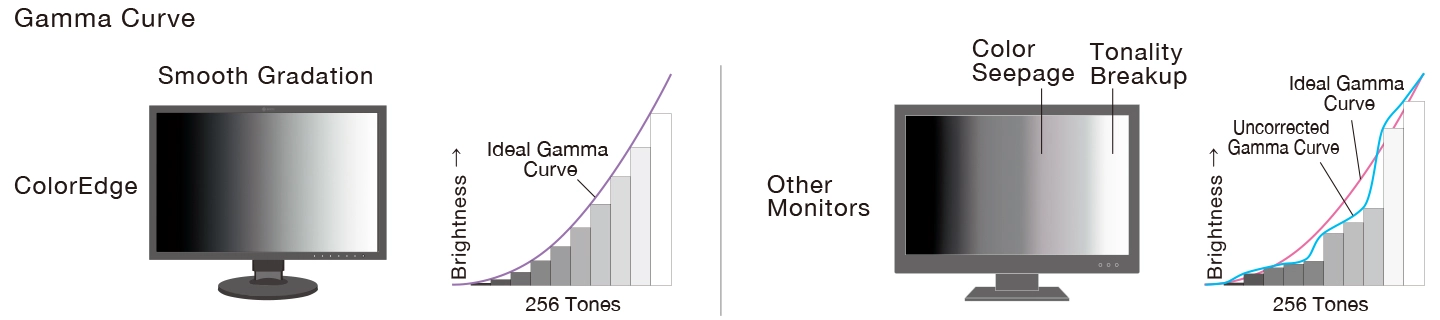
The gamma level for each ColorEdge monitor is adjusted at the factory by measuring the R, G, and B gamma values from 0 – 1023. The monitor’s 24-bit look-up-table (LUT) is then used to select the 1024 most appropriate tones and achieve the desired value. This ensures the smoothest color gradations in your images.
Uniformity Across the Screen
LCD monitors commonly exhibit fluctuations in brightness and chromaticity across the screen, affecting color accuracy. To counter this, ColorEdge monitors are equipped with EIZO’s patented digital uniformity equalizer (DUE) technology which corrects deviations in every tone across the screen to ensure stable display.
・Japan patent no. 4490899, 4542988, 5618574, 5651419
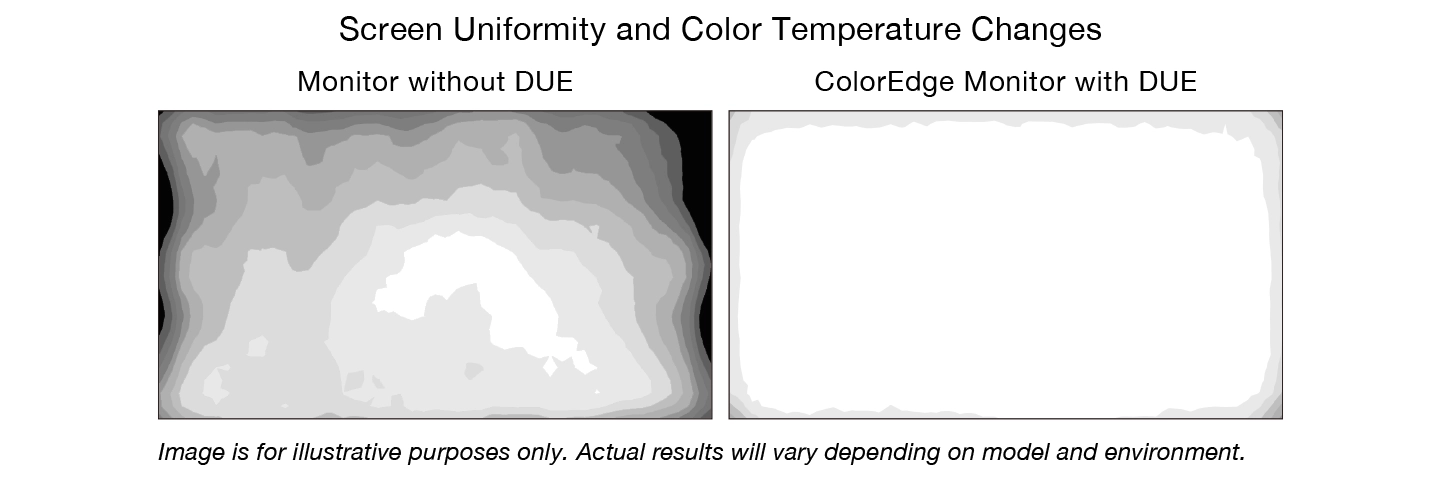
Image is for illustrative purposes only. Actual results will vary depending on model and environment.
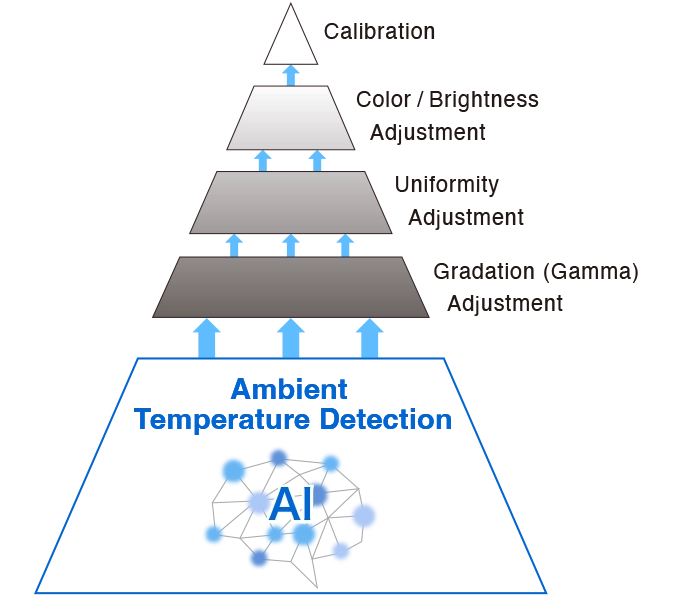
| Stable Display Using Industry-First AIThe color and brightness of an LCD monitor can shift due to changes in ambient temperature. ColorEdge CG Series monitors are equipped with a temperature sensor that measures the temperature inside the monitor and estimates the ambient room temperature. Using this technology, the monitor adjusts in real time to maintain accurate gradation, color, brightness, and other characteristics.
In addition, the monitor uses AI (Artificial Intelligence) in its estimation algorithm to detect and distinguish patterns in temperature changes for more precise calculations to ensure stable and accurate display.・Japan patent no. 6723964Learn more |
 |
Stable Color in Just 3 Minutes
A typical monitor takes 30 minutes or more for its brightness, chromaticity, and tone characteristics to stabilize. ColorEdge monitors take a mere 3 minutes* so you get reliable color display soon after turning the monitor on.
*Based on EIZO’s internal testing.
| Verified Accuracy with Factory ReportIncluded in the box of every CG3100X is a Factory Report which shows the measurement results at the time of production. The report includes uniformity, gamma, gamut coverage, and color temperature measurements which verify every unit’s accuracy.Learn more | 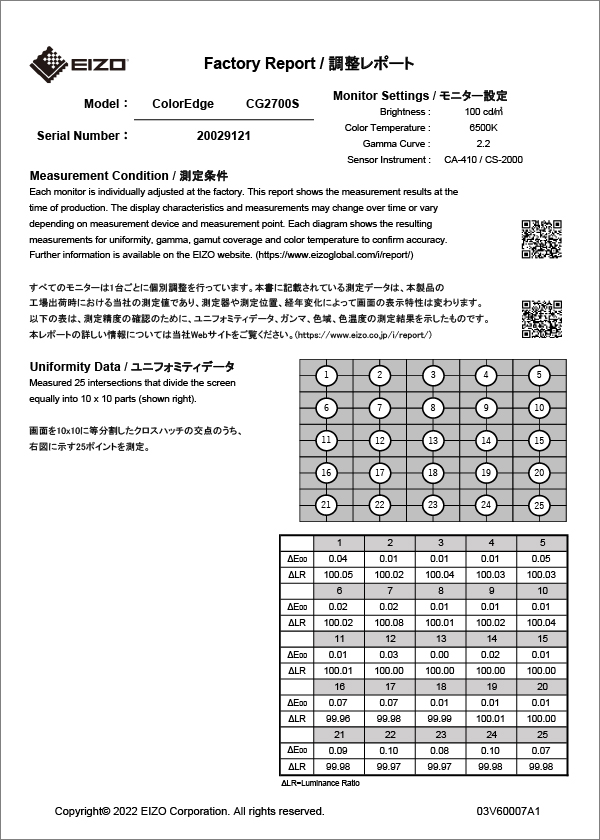 |
Commitment to Quality
5-Year Manufacturer’s Warranty
 ColorEdge monitors are backed by a manufacturer’s 5-year warranty that covers all components including the LCD panel*. EIZO manufactures its products at its own factories to allow close control over production quality and ensure each monitor is built to last.
*Usage time is limited to 30,000 hours.
Zero Bright Pixels

EIZO guarantees this product will be free from bright sub-pixels for six months from the purchase date.
See our Bright Pixel Policy for more details
Certified for Quality and Performance
| The monitor is recognized by Fogra as a Class A FograCert Softproof Monitor. Using it in a FograCert Softproofing System ensures designers, print specifiers, and print producers can rely on the soft proof for predictable and consistent results. |  |
Sustainable Future
| Low Environmental Impact MaterialsThe CG3100X’s housing is made of more than 85% recycled plastic. This contributes to reducing the amount of plastic waste entering the environment, conserves resources, and promotes the reuse of materials to preserve our natural ecosystems. | 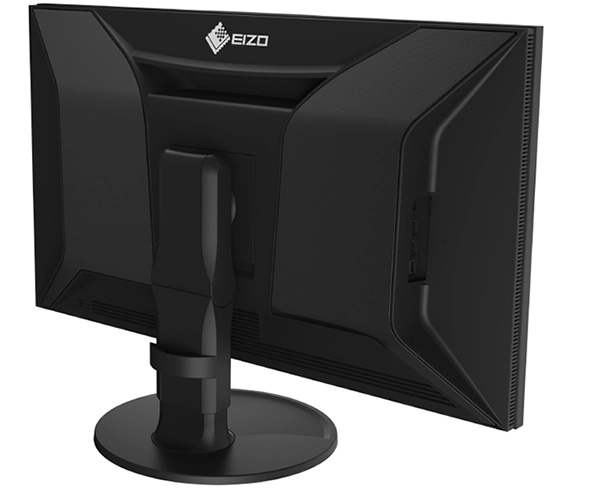 |
Eco-Conscious Packaging
EIZO is committed to reducing its environmental impact by transitioning away from plastic and other environmentally unfriendly materials in product packaging. The CG3100X is securely packaged using molded pulp made from recycled cardboard and newspaper, and its cables are contained within a cardboard structure instead of plastic bags.
Our Contribution to SDGs
| As part of its sustainability initiatives, EIZO is contributing towards the United Nations’ Sustainable Development Goals (SDGs). |  |
| Environmentally Conscious Product Development ColorEdge promotes the use of recycled materials and low-impact components, while maintaining the high performance demanded for creative work. The monitors are optimized for energy efficiency, contributing to lower greenhouse gas (GHG) emissions. EIZO also collects and recycles used products to further minimize environmental impact. We strive to promote efficient and circular resource use across every stage of the product lifecycle – from parts and materials procurement to manufacturing, transportation, user experience, and end-of-life disposal. All production sites at EIZO’s headquarters in Japan operate on 100% renewable energy.Learn more |
   |
|
| Color Precision for Creative Excellence ColorEdge provides a high-precision color management solution for creative environments, powered by advanced display technology and consistent color control. Unified color management across the entire production workflow streamlines color communication across creative teams and studios, helping to reduce time and costs associated with rework due to color inconsistencies. |
Matching your screen to your prints
Printing your work? Browse DTG’s photo printers and fine-art printers, or order a custom ICC printer profile for your paper and ink. Questions? Call DTG in Tampa, FL at 813.889.0660.
EIZO ColorEdge CG3100X FAQ
What is the EIZO ColorEdge CG3100X?
The EIZO ColorEdge CG3100X (DTG part number CG3100X-BK, EIZO model CG3100X-BK) is a 30.5-inch 4096 x 2160 (17:9) color management monitor with Adobe RGB 97% and DCI-P3 99% coverage (EIZO, typical), a built-in calibration sensor and USB-C with up to 94 W power delivery.
Does the EIZO ColorEdge CG3100X have a built-in calibration sensor?
Yes. EIZO lists a built-in calibration sensor, so the monitor can calibrate itself (SelfCalibration) on a schedule with ColorNavigator 7, without an external device.
What color gamut does the EIZO ColorEdge CG3100X cover?
EIZO lists Adobe RGB 97%, DCI-P3 99% (typical). Display colors: 1.07 billion colors, 10-bit display (24-bit LUT).
Does the EIZO ColorEdge CG3100X support HDR?
Yes. EIZO lists HDR gamma support for HLG and the PQ curve. Preset modes: User, BT.2020, BT.709, DCI-P3, PQ_DCI-P3, HLG_BT.2100, Adobe RGB, sRGB, Calibration (CAL), SYNC_SIGNAL.
What inputs does the EIZO ColorEdge CG3100X have?
EIZO lists these video inputs: USB Type-C, DisplayPort, HDMI. The USB-C port supplies up to 94 W of power to a connected laptop. USB downstream: USB 5Gbps: Type-A x 2, USB 2.0: Type-A x 2.
Is a light-shielding hood included with the EIZO ColorEdge CG3100X?
Yes. EIZO lists a monitor hood in the supplied accessories.
How bright is the EIZO ColorEdge CG3100X?
EIZO lists 500 cd/m² brightness, 1800:1 contrast and 15 ms (gray-to-gray) response time (typical values).
How big and heavy is the EIZO ColorEdge CG3100X?
EIZO lists 721 x 428.1 – 583.1 x 290 mm (W x H x D, landscape, with stand) and a net weight of 12.3 kg (about 27.1 lb) with the stand. Height adjustment range: 155 mm.
What warranty comes with the EIZO ColorEdge CG3100X?
EIZO lists a 5-year manufacturer's warranty for ColorEdge monitors (usage time limited to 30,000 hours) and zero bright sub-pixels for six months from the date of purchase.
Where can I buy the EIZO ColorEdge CG3100X?
Order it from DTG (Digital Technology Group) online or call a DTG specialist toll-free at 800.681.0024. Tech support on DTG's toll-free line is free.
Specifications from EIZO's EIZO ColorEdge CG3100X product page (checked October 8, 2026). Specifications are subject to change by EIZO. Questions? Call DTG toll-free at 800.681.0024 or contact us online.
 EIZO ColorEdge CG3100X Datasheet (PDF)


